Workflow Executions
.
Workflow Executions
The Workflow Executions section allows you to track how your Workflows are performing.
Use the drop-down menu at the top right of the screen to adjust the selected time period.
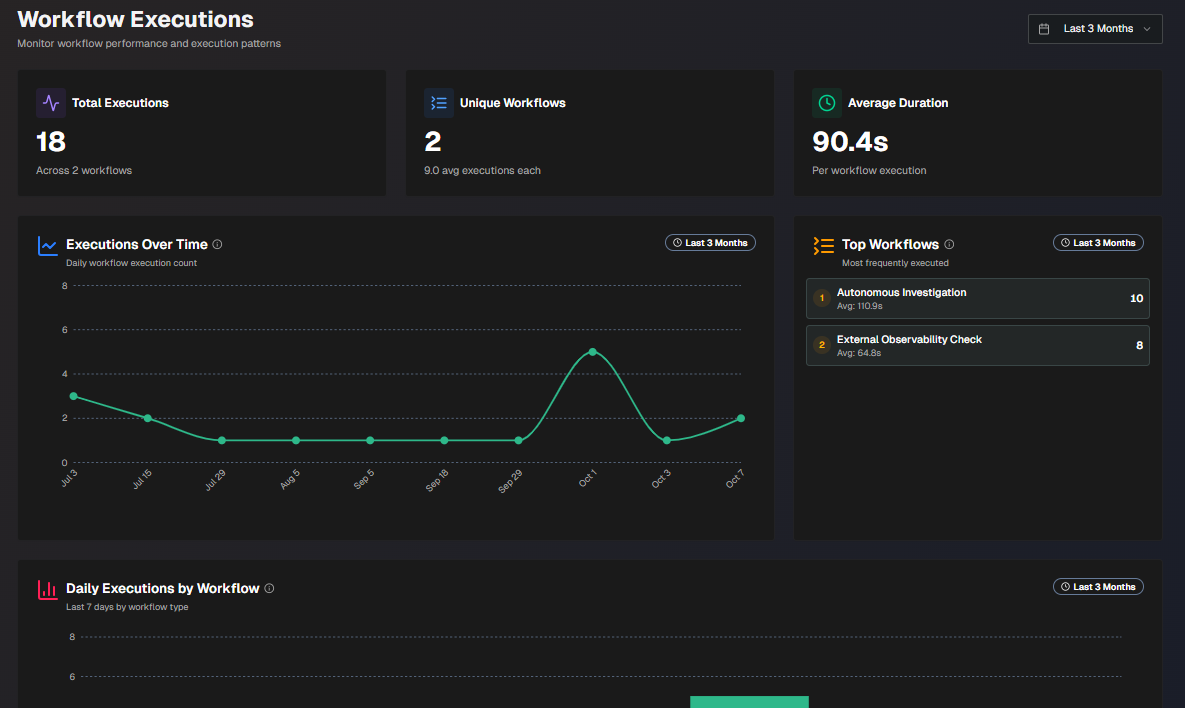
Workflow Executions
The following report widgets are available in the Workflow Executions section:
Report | Description |
|---|---|
Total Executions | Total number of times that all of your workflows have been used. |
Unique Workflows | Total number of unique workflows, and the average number of times each has been used. |
Average Duration | The average number of time each workflow execution takes. |
Executions Over Time | Daily count of your workflow executions, over time. |
Top Workflows | Top 10 most frequently used workflows. Each workflow displays the number of times it was used, and the average execution time. |
Type Distribution | A pie chart comparing the types of workflows executed. Hover over a section of the chart to view the number of times the type of workflow was executed, and the percent of the total number of executions. |
Daily Workflow Type Trend | Displays trends in workflow executions over time, broken down by type. Hover over a specific section of the chart to view the number of workflows by type that were executed on that day. |
Daily Executions by Workflow | Breakdown of daily workflow executions by workflow name, over time. |
All Workflow Execution Metrics | Detailed statistics for all executions, by workflow. The following information is displayed for each workflow:
|
Recent Workflow Execution Results | The latest 500 workflow executions. At the top of the section, you can filter by Workflow Name, Workflow Type, or App Type. Click Export to CSV to download a CSV file containing the table. The following information is displayed for each workflow execution:
|